Export one page
Open the PDF locally and export, print, or screenshot only the page you need to share.
Private document redaction
MaskBeforeShare handles image redaction today. For a PDF, export or screenshot the page, mask the sensitive details locally in your browser, then share the flattened PNG instead of the original document.
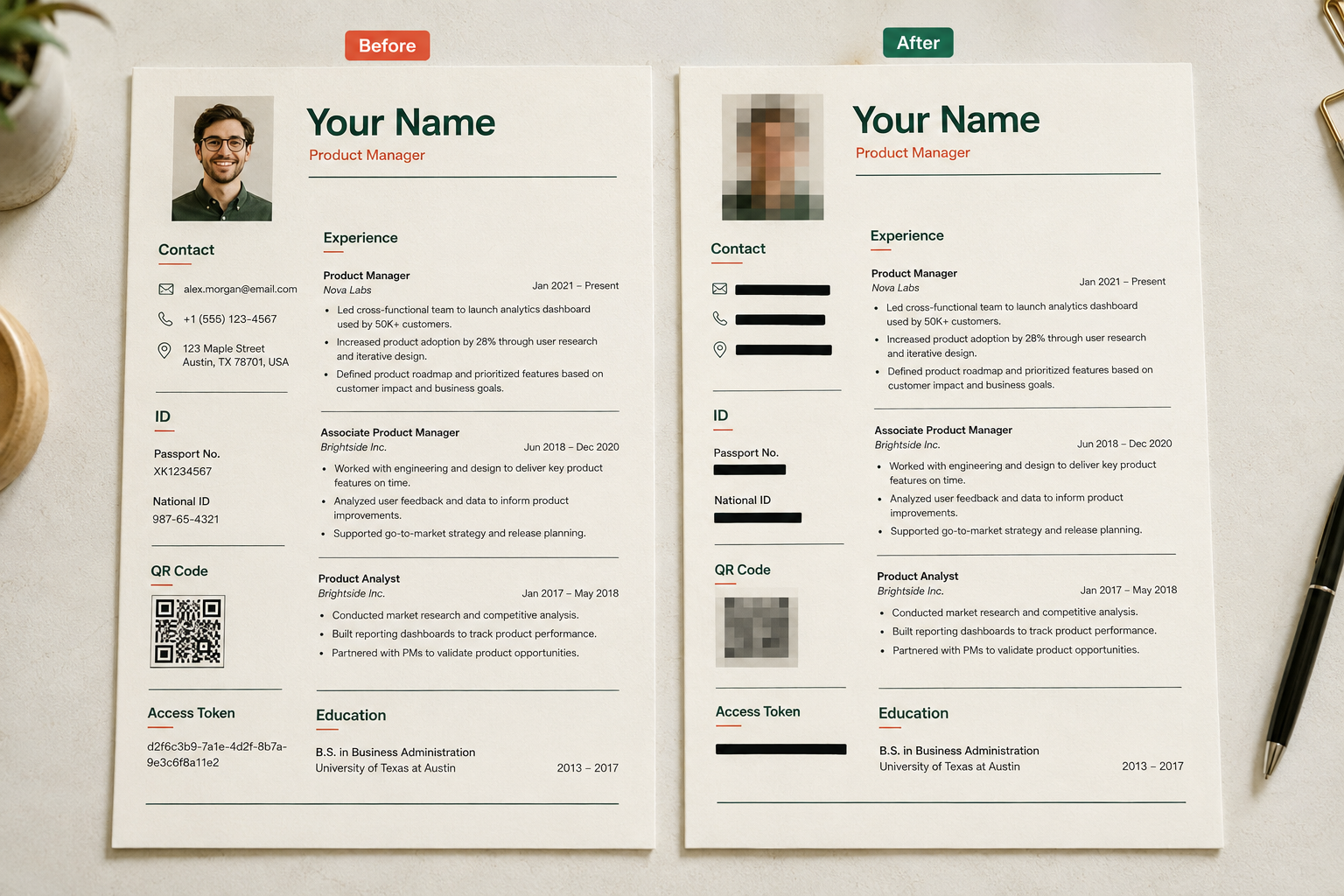
A screenshot or exported page image removes selectable PDF layers. After masking, the exported PNG contains new pixels, not hidden document text.
Open the PDF locally and export, print, or screenshot only the page you need to share.
Hide names, faces, emails, phones, IDs, account numbers, QR codes and internal notes before export.
Send the flattened PNG when a visual proof is enough. Keep the original PDF private and untouched.
Before sharing
PDF pages often expose small identifiers in headers, footers, stamps, QR codes and email threads. Review the whole page after masking, not just the main paragraph.
No. Export or screenshot the required PDF page using a separate viewer, then import the image. MaskBeforeShare exports a PNG, not a redacted PDF.
A newly rendered PNG does not preserve the original selectable PDF text layers. Visible information can still leak: cover every private region with opaque blackout and inspect the final image. Keep the original PDF private.
Review names, faces, addresses, emails, phone numbers, IDs, account numbers, barcodes, QR codes and confidential notes. Preserve the information the recipient requires.